Showing posts with label smart phone. Show all posts

Tuesday, August 28, 2012

Voting Program Launches Website for Smartphones


From a Federal Voting Assistance Program News Release

ALEXANDRIA, Va., Aug. 28, 2012 – Service members, their families and U.S. citizens living overseas now have voting information at their fingertips with the Federal Voting Assistance program’s new mobile website.

The site provides an interface that quickly leads users to voting information in an easy-to-read, mobile-friendly format.

Accessible from any smartphone, the site connects voters with the latest news alerts, absentee voting information, state election dates, key contact information, and answers to frequently asked questions. Users also can sign up for FVAP’s voting alerts.

Users will be directed automatically to the mobile website when they visit FVAP.gov from a mobile browser.

Sunday, August 12, 2012

PE COACH Mobile App Supports Prolonged Exposure Therapy


By Robyn Mincher
DCOE Strategic Communications

The Departments of Defense and Veterans Affairs (DoD/VA) have released “PE Coach,” a smartphone mobile application for use with posttraumatic stress disorder (PTSD) treatment.

PE Coach is a form of “prolonged exposure” therapy available to all past and present service members — including the more than 10,000 Wisconsin Soldiers and Airmen who have deployed since 9/11 — as a way to help diagnos and treat symptoms of PTSD.

“As technology grows – our ability to find new ways to get information out to our service members and their families needs to grow as well. This new technology is another great tool for our service members and their families to use while transitioning back into their normal routines following a mobilization.” said Vicki Cushman Edgren, director of the Wisconsin National Guard Badger Yellow Ribbon program.

“In addition to our three phases of reintegration, PE Coach can be a valuable tool for our Soldiers and Airmen to use when returning from deployment and beyond. It especially speaks to the younger generation who already utilize phone apps in many other areas of their lives,” she continued.

Both the DoD and DVA use prolonged exposure (PE) therapy as an effective treatment for PTSD.

Psychologists at the Defense Department’s National Center for Telehealth and Technology, known as T2, and VA National Center for PTSD, developed the mobile app to specifically help patients with their therapy.

“‘PE Coach’ is a helpful tool that assists our service members and veterans who are between visits and in treatment for posttraumatic stress disorder,” said Dr. Jonathon Woodson, assistant secretary of defense for health affairs. “We have shared this app with our military health care providers as well, and hope that many individuals who are receiving PE therapy will find it useful.”

Prolonged exposure therapy helps a patient process a trauma memory to reduce the distress and avoidance caused by the trauma. The patient revisits the memory with a therapist and as the memory is emotionally processed, anxiety decreases. The therapy also helps the patient confront avoided situations that trigger memories of the trauma.

“We worked with a broad and diverse group of psychologists in the DoD and VA who are treating PTSD patients with prolonged exposure therapy,” said Dr. Greg Reger, clinical psychologist with the T2 Innovative Technology Applications division. “We wanted to help our patients in the therapy and make it easier for providers to deliver this treatment. PE Coach does both.”

Many psychologists who provide prolonged exposure therapy acknowledge it could be more effective if patients could better adhere to their assignments between sessions.

The patient installs “PE Coach” on their smartphone and can record the therapy session for playback between sessions. The app also provides an explanation of exposure therapy, assignments, explanations of PTSD and its symptoms, and a convenient way to write notes about typically avoided locations, situations and events for later discussions with their therapist.

Reger said that writing in a notebook in public places may make people feel uncomfortable. However, tapping a note on a smartphone is much easier and a more personal way to capture those in-the-moment feelings.

“PE Coach” will help users successfully adhere to PE treatment, which could improve the quality of treatment. Reger said it was not designed to be used as a self-help tool and should not replace professional counseling.

The Defense Department and VA released a similar mobile app last year; “PTSD Coach” is a reference tool for education, tracking symptoms, self-assessments and connections to support individuals with PTSD.

“PE Coach” is available for Apple and Android mobile devices. Find more information about the app at t2health.org/apps/pe-coach.

The National Center for Telehealth and Technology, located at Joint Base Lewis-McChord, Wash., serves as the primary Department of Defense office for cutting-edge approaches in applying technology to psychological health. More information about T2 is at t2health.org.

T2, a Defense Centers of Excellence for Psychological Health and Traumatic Brain Injury center, designs, tests and evaluates available and emerging technologies in support of psychological health and traumatic brain injury recovery for service members, veterans and their families. To learn more, read “About T2.”

Tuesday, June 26, 2012

Bomb Threat? An App for that, too


Homeland Security’s new smartphone application for bomb threats

At approximately 6:30 pm on Saturday, May 1, 2010, a smoking SUV in Times Square was reported by alert street vendors. Acting quickly, NYPD evacuated vast stretches on 7th and 8th Avenues, including Broadway theatres and several other buildings and hotels in the area. The entire area was barricaded. Times Square on a Saturday evening before the shows is teaming with people, and the terrorist knew that. The bomb failed, but had it detonated, it would have killed and wounded many, according to NYPD.

In the first chaotic moments after suspicion of a bomb threat, first responders have a myriad of questions, assessments, and decisions to make, all at once, and all the while the scene could be changing rapidly. Is the bomb real? How large is the potential blast radius? Where will we evacuate people? Are there any critical infrastructure or special-needs population centers in the vicinity? Any schools, hospitals nearby? What roads should be closed? Which roads should stay open for evacuees? And on and on....

What if they could get all this information in one place?

Now they can: The U.S. Department of Homeland Security's (DHS) Science and Technology Directorate (S&T) and its public and private sector partners have developed a must-have "app": the First Responder Support Tools (FiRST) for computers and smartphones.

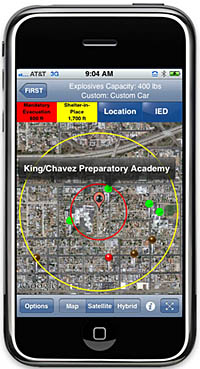
The FiRST application was developed in partnership with the DHS National Protection and Programs Directorate's (NPPD) Office of Infrastructure Protection (IP) along with its Office for Bombing Prevention (OBP), and Applied Research Associates, Inc. (ARA). The FiRST app provides information directly to first responders on their smartphones or laptop computers in order to quickly define safe distances to cordon-off around a potential bomb location, calculate rough damage and injury contours, suggest appropriate roadblocks, determine when mandatory evacuation or shelter-in-place circumstances apply, and to identify nearby areas of particular concern: schools, hospitals, care centers. The application also provides the geospatial information regarding potential injury, glass, or structural damage impact area.

"That's why it works," said Christine Lee, FIRST program manager in S&T's First Responders Group. "Bomb threat scenarios do not reflect a one-size-fits-all approach, and this app allows users to customize information to help them make informed decisions for response."

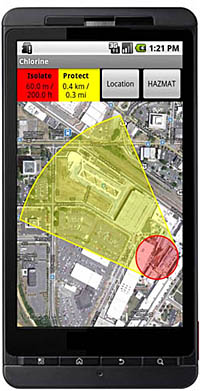
The FiRST application also includes HAZMAT response information based on the Emergency Response Guidebook (ERG) which includes information on over 3,000 hazardous materials. In addition to providing health precautions and response guidance, FiRST also retrieves current and forecast weather to show downwind protection zones for over 600 materials that are inhalation hazards.

FiRST is available to first responders for a nominal fee (about $12 for mobile devices and $100 for Window PC version).  The app will be of interest and applicable to anyone who might need to address a potential bomb or HAZMAT spill response, such as industry, HAZMAT transport, or security personnel.  HAZMAT information is available to all users.   Specifically defined DHS bomb standoff data is considered sensitive and is automatically made available to those that register the application with a .gov, .mil, or .us email address. Users without a .gov, .mil, or .us email address can be approved for access on a case-by-case basis in coordination with the Office of Bomb Protection.   (However, any user can input into the app and define his own custom bomb and standoff distances, which might be applicable to certain jurisdictions and/or localities.) 

The FiRST app uses services readily available with current smartphones: email, phone, Google Maps, Google Search, and weather and road network data. "We use existing hardware that responders are already familiar with because responders can't waste time navigating a complex interface during the chaos of an incident," said Carl Jerrett, ARA program manager. "No longer will they have to carry additional tools such as hard-copy blast standoff guidance cards, rulers, or maps." Sergeant Thomas Sharkey, the District of Columbia Metro Transit Police Bomb Squad Commander, said "Unlike other confusing software on desktop computers, this application is easy to purchase, easy to install, and even easier to use."

Once a first responder enters a general definition and location of the bomb or HAZMAT incident into the FiRST app, the results are instantaneous. They can run a roadblock analysis to identify which roads are best suited for closure in order to isolate a bomb threat within that specific region. Google Search features are available to identify and display locations where increased numbers of the public may be at potential risk. "FiRST allows responders to label a map with critical information, and this information not only helps first responders better understand an incident, but these maps can then be shared with other responders," said Jerrett. Users can quickly send results to colleagues via email, which includes a text summary, a map image, and GIS file attachments that are viewable in applications like Google Earth or WebEOC¨.

The FiRST app is available for iPhones and iPads, Androids, and Windows personal computers. The application is available for purchase at a nominal fee on iTunes, the Google Play, and ARA's e-commerce website.

FiRST field evaluations were conducted last year by the Washington Metropolitan Area Transit Authority, bomb squad, police, EMT, firefighter, and hazmat units. United States Secret Service personnel observed the evaluations as well. After the application testing and evaluation phases were completed, Sharkey said, "This app is a must-have for bomb technicians and first responders."

Thursday, April 5, 2012

Virtual wingman app makes smart choices easy for Airmen


By Air Force Maj. Rosaire Bushey
Air Education and Training Command

JOINT BASE SAN ANTONIO -- RANDOLPH, Texas  -- Air Education and Training Command unveiled a new mobile phone application that is designed to provide resiliency and safety information to Airmen. The app was shown at the Air Force Community Action Information Board meeting March 29.

Among the highlights of the app are features such as a local taxi finder and information on high-risk activities, according to Mr. Robbie Bogard, AETC ground safety manager.

“For people who live in the continental United States, the app will allow people to use GPS tracking to determine where you are and show phone numbers for local taxis,” he said. This makes it easier for people to make a smart decision when they find themselves without a designated driver in a strange place.

Other features include Airman-to-Airman videos, information on risk management, hazard reporting, motorcycle safety, crisis/distress support, sexual assault prevention/response, and more.

“The app is not meant to be a primary resiliency tool or replace face-to-face interaction with other Airmen,” Bogard said. “But, it does supplement this interaction when another Airman isn't available. Our goal in developing the “Virtual Wingman” was to provide information to all our Airmen through a readily available tool most Airmen have - a mobile phone.

“We hope that we provide all Airmen access to the wide variety of great safety and resiliency information available from various Air Force sources,” he said. “Often, this information is difficult to find, so we sought out pertinent information and consolidated it in one place for our Airmen. We are hoping this will prove to be a valuable tool for everyone.”

“While Air Education and Training Command is having a very good year as far as safety is concerned, we want to continue to innovate in how we reach our Airmen so we can drive our mishap rates down to historical lows,” said Air Force Master Sgt. Kyle Baum, AETC Ground Safety Division.

“Our Airmen will now have a series of tools they can access when they have concerns with risk management and safety. And we didn't limit it just to safety-related topics; we also included information on both suicide prevention and sexual assault prevention, areas of concern across our Air Force,” he said.

The application, which is not platform specific, will work on any mobile device with access to the internet, although some functionality may be lost on older devices, according to Carol Wall, the Air Force Virtual Wingman project manager.

“Any mobile user who has a mobile device capable of web browsing, can download the application for free and the app will work on a personal computer as well,” Wall said.

To view a video overview of the Virtual Wingman application, go to: http://youtube/l8Lzy6J7z2M.

Sunday, February 5, 2012

FBI Updates Free Child ID App

Daniel McMullen, Special Agent in Charge (SAC) of the Jackson Field Office of the Federal Bureau of Investigation (FBI), is notifying Mississippi parents that the FBI Child ID App has been updated with new features.

The FBI Child ID App, which is currently available for use only on iPhones and only downloaded for free from the App Store on iTunes, was launched on August 5, 2011 as a tool for parents. This free app, the first mobile application created by the FBI, provides a convenient place for parents to electronically store photos and vital information about their children so that information is readily available if needed. The app also includes tips on keeping children safe, as well as specific guidance on what to do should a child go missing.

In response to user feedback, the Child ID App has been updated to include the following features:

Passwords: Parents now have the option of password protecting the application.

Photos: Parents can now add any pictures from their iPhone’s image library.

Other additions include new icons and styles, smarter keypad input fields, and data protection that prevents the loss of unsaved data should the application be closed before saving.

“The FBI does not collect or store data from this app,” stated SAC McMullen. “Our goal in creating this application is to enable parents to provide pictures and physical identifiers to security or law enforcement officers immediately upon realizing a child is missing. This is a tremendous tool to be utilized in conjunction with parents educating their children about personal safety. It literally allows parents to put their children’s safety in their own hands. ”

Friday, January 20, 2012

New Museum App Released on iTunes and Android Market

Pensacola, Fla.– January 19, 2012 – To start the new year, download the official app of the National Naval Aviation Museum from iTunes and the Android Market. Located aboard NAS Pensacola, Florida, the National Naval Aviation Museum is one of the world’s largest aviation museums with over 350,000 square feet of displays and more than 150 beautifully restored aircraft representing Naval, Marine Corps and Coast Guard Aviation.

The National Naval Aviation Museum app is your go to source for information on the Museum aircraft and exhibits including exclusive photos and videos. Featuring an interactive map of the Museum and comprehensive guide to the collection, users have the ability to build their own tours, learn more details of the aircraft and displays, and keep track of upcoming events and museum news.

Cost for the app is $1.99 and all proceeds support the Museum, the Naval Aviation Museum Foundation and its mission to “Inspire and Educate” the public through the history of Naval Aviation. Last fall, the Foundation also released the official Blue Angels app also available on iTunes and the Android Market.

Features include:

    Interactive map of the facility giving you instant access to the Museum collection.
    Detailed descriptions, photos and multi-media of over two hundred Museum exhibits and aircraft.
    Create your own tour of the Museum or select one of our pre-built tours to act as your digital docent.
    Museum Twitter and Facebook feeds for the latest news and updates.
    A complete listing and guides to Museum activities, upcoming events, Blue Angels practice schedule and new exhibits.

Media Note: For more information about the National Naval Aviation Museum and Apps, contact Shelley Ragsdale or Donald Watson, Naval Aviation Museum Foundation, Inc. at (850) 453-2389 or by e-mail at sragsdale@navalaviationmuseum.org or dwatson@navalaviationmuseum.org.

About the National Naval Aviation Museum
The National Naval Aviation Museum features nearly 350,000 square feet of displays and is one of the world’s largest aviation museums. Located aboard Pensacola Naval Air Station, the facility boasts more than 150 beautifully restored aircraft representing Navy, Marine Corps and Coast Guard aviation, and is Florida’s most-visited museum. Be sure to visit the Museum’s new expansion, Hangar Bay One, displaying aircraft of the post- WWII era including Marine One presidential helicopter. Among the countless things to touch, see and experience are thrilling 3D MaxFlight simulators and a variety of special exhibits, as well as the drama and power of amazing IMAX® films. The Cubi Bar Café offers a unique dining experience, and the Flight Deck Store is the perfect place to find a memento of the spirit of Naval Aviation. Museum admission is free. The National Naval Aviation Museum is open daily from 9 a.m.–5 p.m., except Thanksgiving Day, Christmas Day and New Year’s Day. For more information, visit www.NavalAviationMuseum.org.

Wednesday, January 11, 2012

NASA's Online Radio Station Rocks Smartphones

Bob Jacobs
Headquarters, Washington

Jessica Culler
Ames Research Center, Moffett Field, Calif.

MOFFETT FIELD, Calif. -- NASA's Third Rock Radio just got mobile. Updates to the NASA App for iPhone, iPod Touch, iPad and Android now include a feature to listen to the agency's new online alternative rock radio station.

"Now you can listen to great music in the same app that still provides all of NASA's amazing content wherever you are," said Jerry Colen, NASA App project manager at NASA's Ames Research Center in Moffett Field, Calif.

Third Rock - America's Space Station launched with a new rock/indie/alternative format on Dec. 12, 2011. The station is being developed and operated at no cost to the government through a Space Act Agreement.

The NASA Apps showcase a wealth of NASA content, including images, videos on-demand, live streaming video from NASA Television, mission information, feature stories and breaking news. Users also can find sighting opportunities for the International Space Station and track the positions of spacecraft orbiting Earth. App users easily can share NASA content on Facebook, Twitter or via e-mail.

For more information and to links download the apps, visit http://www.nasa.gov/nasaapp.

For more information on and to listen to Third Rock, visit http://www.nasa.gov/thirdrock.

- end -

Monday, November 28, 2011

Frontline Psych with Doc Bender: Use Technology to Your Benefit

By Dr. James Bender, DCoE psychologist

Dr. James Bender is a former Army psychologist who deployed to Iraq as the brigade psychologist for the 1st Cavalry Division’s 4th Brigade Combat Team out of Fort Hood, Texas. During his deployment, he traveled through Southern Iraq, from Basra to Baghdad. He writes a monthly post for the DCoE Blog on psychological health concerns related to deployment and being in the military.

Technology has dramatically changed our world during the past 20 years, including how we approach psychological health care, and mostly for the better. Twenty years ago, if you wanted to find out about post-traumatic stress disorder (PTSD), you could either make an appointment with a psychologist or spend countless hours at a library reading books and professional journals. Now, great information is just a click away.

If you have a smartphone for example, you can instantly download free mobile applications such as the PTSD Coach, and learn about PTSD and ways to help you manage its symptoms. There are apps to track your mood during a period of time and give you and your provider information to help diagnose a possible mood or anxiety disorder. Treatment guidelines to help providers manage patients with mild traumatic brain injury (TBI) are even available on a smartphone. There are lots of good online assessment tools, and although they don’t give a clinical diagnosis of a disorder, they can get you thinking about your well-being and help start a conversation with a mental health care provider if needed.

When I was seeing patients, it impressed me when someone came to my office with a printout from a website describing a particular problem or topic. It showed me that they cared enough to seek out information and were proactive in their care.

But here are a few points to keep in mind when you’re educating yourself on psychological health concerns:

 ■Make sure to get your info from credible sources: DCoE, American Psychological Association, afterdeployment.org and Department of Veterans Affairs are great sources for info on TBI, PTSD, depression and other military-related mental health concerns
■While many sources are good, a few are poor. Be wary of sites that try to sell you something, make outlandish claims or offer quick results. Treatment for mental health conditions works, but it takes time and effort
■While these resources can educate you and give you things to talk about with your provider, they should not serve as a substitute for professional help

Another example of how technology is improving the way people can access information is being able to connect with someone instantly and at any time. The DCoE Outreach Center is available through online chat and whether you’re a service member, veteran, family member or provider, you can speak to a health resource consultant who can provide guidance and resources 24/7.

I often participate in webinars. I can sit at home and virtually attend a TBI symposium across the country given by great researchers. This makes me a better psychologist and allows me to do my job better. If you find a topic that interests you, why not take advantage of all this technology to learn more about it?

After all, it is clear that technology is here to stay, and I encourage you to embrace it as a tool that can help you improve your psychological health. Thanks for reading and for your service.

Saturday, November 19, 2011

New Mobile Apps Help Users Self-manage Behavior, Diagnose, Assess

Most of us know what a mobile application is—chances are if you own a smartphone, you have downloaded not one, but multiple apps and for various purposes. I, for example, depend on my weather app to know if I should grab my umbrella, or leave it at home. 

Standing apart from weather, music and game apps are a new genre of smartphone programs specifically designed for troops and health care providers. These apps, developed by National Center for Telehealth and Technology (T2), a center of Defense Centers of Excellence for Psychological Health and Traumatic Brain Injury (DCoE), address a more serious matter: psychological health and traumatic brain injury (TBI).

I spoke with Dr. Nancy Kao Rhiannon, a T2 psychologist and mobile application program manager, about some of these new apps (soon to hit the market) and how specifically the military community can benefit from using them.

“In the military, there’s a certain demographic that uses mobile applications regularly—around 60 percent of service members download apps on their smartphones,” said Rhiannon. “We saw that we could leverage this technology to help improve their psychological health.”

These new mobile apps, developed for both service members, concerned significant others and providers can help users cope with psychological concerns, and aid providers in diagnosis of post-traumatic stress disorder (PTSD) and TBI.

Here are a few we discussed:

PE Coach – Helps providers treat psychological health concerns of service members through prolonged exposure, which according to Rhiannon, is one of the most effective treatments for PTSD. Users go through a series of steps on their phone that exposes them to images of events on the battlefield, helping them engage and remember experiences, rather than avoid them. This app helps users self-monitor their behavior and educates them about PTSD and resources for coping.

Life Armor – This mobile app derived from afterdeployment.org is a resource for service members, veterans and their families experiencing common post-deployment issues.

“What’s great about this app is that topics addressed on the website can now be easily accessed from a smartphone,” said Rhiannon. “Service members can learn, self-manage, watch videos and search for resources in various topics surrounding deployment challenges.”

T2 has also developed three mobile apps for providers that assist in diagnosing TBI and psychological health concerns, and help them cope with compassion fatigue.

Provider Resilience – Is a self-care tool for providers who might be experiencing compassion fatigue while caring for others. The app provides behavior management techniques, a countdown clock that monitors leave time, tracks resilience progress, and has fun ways to boost resilience.

“The app displays a daily cartoon for a good laugh, and providers can benefit from inspirational value cards,” Rhiannon said. “It’s well-understood that providers and caregivers are at risk for vicarious trauma in their high-tempo, high-stress jobs, and this app can help prevent compassion fatigue.”

Co-occurring Conditions Toolkit – One of the most downloaded DCoE resources will soon be available on a smartphone. The mobile version of the toolkit contains the entire comprehensive clinical guidance tool to help primary care providers assess and manage patients with co-occurring mild TBI and psychological health disorders.

Mobile Screener (not available to the public) – Assists providers in screening psychological vital signs and sends the information to a secure server for further analysis. 

“This app can be used in the field, helping a medic screen a service member after a critical incident, provide a quick screen if a service member goes to a clinic, or monitor high-risk patients in between provider sessions,” Rhiannon said.

Just like I use my weather app to keep me dry, perhaps service members will start to check in on their psychological health every day. As more and more service members and veterans become acquainted with mobile applications, they can use these tools privately anytime in the comfort of their own homes, increasing their access to psychological health care.

To see the current T2 apps and keep up on new apps, check out T2’s mobile applications page.

*The mTBI Pocket Guide mobile app is now available for free download on iPhone. The app is a comprehensive resource for providers, on the treatment and management of patients with mild TBI and related symptoms.